
Debugging a PyInstaller EXE file with Windbg
This year, the Midnight Flag CTF featured a Windows reverse engineering challenge centered around a Python PyInstaller executable file. Here is a write-up & lessons learned about reversing this kind of EXE.
TL;DR
If you don’t need explanation and just want the write up, you can go directly to Windbg write-up of the challenge section at the end of this blogpost.
About Midnight Flag CTF
In the field of computer security, the CTF (Capture the Flag) is a type of competitive event or challenge designed to test participants’ skills in various aspect, to find and/or exploit vulnerabilities affecting software, websites or computer systems in order to get a flag (drapeau in French).
The Midnight Flag CTF is the annual cybersecurity competition organized by ESNA students
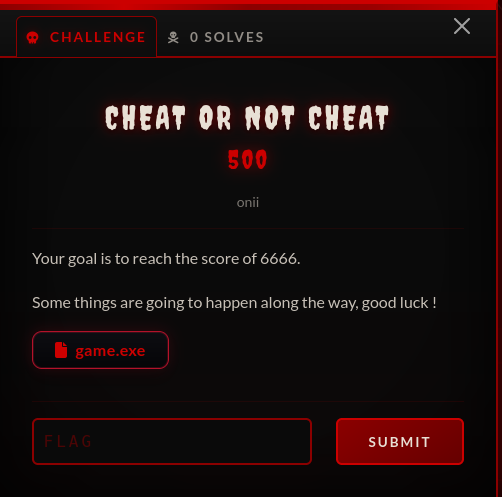
Starting the challenge ‘Cheat or not Cheat’
Here is the challenge :
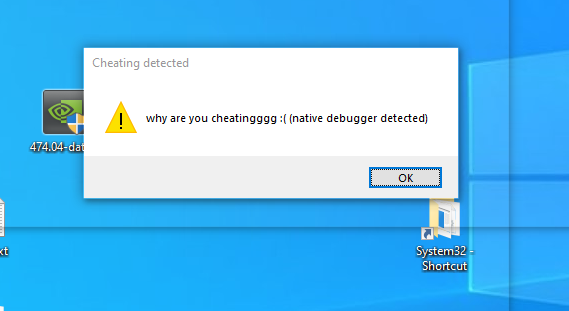
Launch the game, attach with windbg to the subprocess game.exe. Native debugger is detected by the game which stops :
But during the first break made automatically by Windbg we can list all modules, and see it is a python file embeded in an EXE.
0:015> lm
start             end                 module name
00000000`62e80000 00000000`62ea4000   zlib1      (deferred)
00000000`68b40000 00000000`68b7c000   libpng16_16   (deferred)
00000000`6a880000 00000000`6a8a7000   SDL2_image   (deferred)
000001f0`d3f50000 000001f0`d3f5f000   python3    (deferred)
00007ff6`52680000 00007ff6`526dc000   game       (deferred)
00007fff`51070000 00007fff`523d6000   libscipy_openblas64__43e11ff0749b8cbe0a615c9cf6737e0e   (deferred)
00007fff`523e0000 00007fff`529b6000   python311   (deferred)
00007fff`59a20000 00007fff`59f19000   libcrypto_3   (deferred)
About PyInstaller
First of all : what is PyInstaller and how it does it ?
-
PyInstaller bundles a Python application and all its dependencies into a single package. The user can run the packaged app without installing a Python interpreter or any modules. PyInstaller supports Python 3.8 and newer.
-
PyInstaller reads a Python script written by you. It analyzes your code to discover every other module and library your script needs in order to execute. Then it collects copies of all those files - including the active Python interpreter! - and puts them with your script in a single folder, or optionally in a single executable file.
Extracting the contents of PyInstaller EXE file
As explain in the previous part, PyInstaller is a tool that converts Python scripts into standalone executable files (.exe) for Windows, macOS, and Linux. The resulting .exe file contains the Python interpreter and all necessary libraries, allowing the program to run independently without requiring Python to be installed on the target system. This makes it easier to distribute Python applications to users who may not have Python installed.
It is all in one packaged file and extracting the contents of PyInstaller generated executable file is easy thanks to PyInstXtractor.
C:\Users\viking\Documents\midnight2026>curl -s -L -O https://github.com/extremecoders-re/pyinstxtractor/archive/refs/heads/master.zip

C:\Users\viking\Documents\midnight2026>tar xf master.zip

C:\Users\viking\Documents\midnight2026>del master.zip

C:\Users\viking\Documents\midnight2026>python pyinstxtractor-master/pyinstxtractor.py game.exe
[+] Processing game.exe
[+] Pyinstaller version: 2.1+
[+] Python version: 3.11
[+] Length of package: 36920494 bytes
[+] Found 241 files in CArchive
[+] Beginning extraction...please standby
[+] Possible entry point: pyiboot01_bootstrap.pyc
[+] Possible entry point: pyi_rth_pkgutil.pyc
[+] Possible entry point: pyi_rth_multiprocessing.pyc
[+] Possible entry point: pyi_rth_inspect.pyc
[+] Possible entry point: pyi_rth_cryptography_openssl.pyc
[+] Possible entry point: pyi_rth_pkgres.pyc
[+] Possible entry point: pyi_rth_pywintypes.pyc
[+] Possible entry point: pyi_rth_pythoncom.pyc
[+] Possible entry point: obf-game.pyc
[+] Found 629 files in PYZ archive
[!] Error: Failed to decompress PYZ.pyz_extracted\numpy\_core\tests.pyc, probably encrypted. Extracting as is.
[!] Error: Failed to decompress PYZ.pyz_extracted\pywin32_system32.pyc, probably encrypted. Extracting as is.
[+] Successfully extracted pyinstaller archive: game.exe

You can now use a python decompiler on the pyc files within the extracted directory
C:\Users\viking\Documents\midnight2026>
As stated in the end of extraction, You can now use a python decompiler on the pyc files within the extracted directory.
Decompile PYC files
Install python 3.12 (required for the next step) and decompile the obf-game.pyc using PyLingual.
C:\Users\viking\Documents\midnight2026>curl -s -L -O https://www.python.org/ftp/python/3.12.9/python-3.12.9-amd64.exe
C:\Users\viking\Documents\midnight2026>python-3.12.9-amd64.exe
C:\Users\viking\Documents\midnight2026>curl -s -L -O https://github.com/syssec-utd/pylingual/archive/refs/heads/main.zip
C:\Users\viking\Documents\midnight2026>tar xf main.zip

C:\Users\viking\Documents\midnight2026>del main.zip

C:\Users\viking\Documents\midnight2026>cd pylingual-main

C:\Users\viking\Documents\midnight2026\pylingual-main>C:\Users\viking\AppData\Local\Programs\Python\Python312\python.exe  -m venv venv

C:\Users\viking\Documents\midnight2026\pylingual-main>venv\Scripts\activate.bat

(venv) C:\Users\viking\Documents\midnight2026\pylingual-main>pip install poetry>=2.0

(venv) C:\Users\viking\Documents\midnight2026\pylingual-main>poetry lock

(venv) C:\Users\viking\Documents\midnight2026\pylingual-main>poetry install

(venv) C:\Users\viking\Documents\midnight2026\pylingual-main>pylingual C:\Users\viking\Documents\midnight2026\game.exe_extracted\obf-game.pyc
[snip]
[12:28:51] INFO     Loading C:\Users\viking\Documents\midnight2026\game.exe_extracted\obf-game.pyc... decompiler.py:444
[12:29:03] INFO     Detected version as 3.11                                                          decompiler.py:452
[12:29:04] INFO     Loading models for 3.11...                                                             models.py:95
[snip]
[12:35:34] INFO     Reconstructing source for obf-game.pyc...                                         decompiler.py:326
           WARNING  pyenv is not installed so equivalence check cannot be performed. Please install   decompiler.py:126
                    pyenv manually along with the required Python version (3.11) or run PyLingual
                    again with the --init-pyenv flag
           INFO     Decompilation complete                                                            decompiler.py:479
[12:35:35] INFO     0.00% code object success rate                                                    decompiler.py:480
           INFO     Result saved to decompiled_obf-game.py                                            decompiler.py:483
And look at this beautiful decompiled_obf-game.py file !
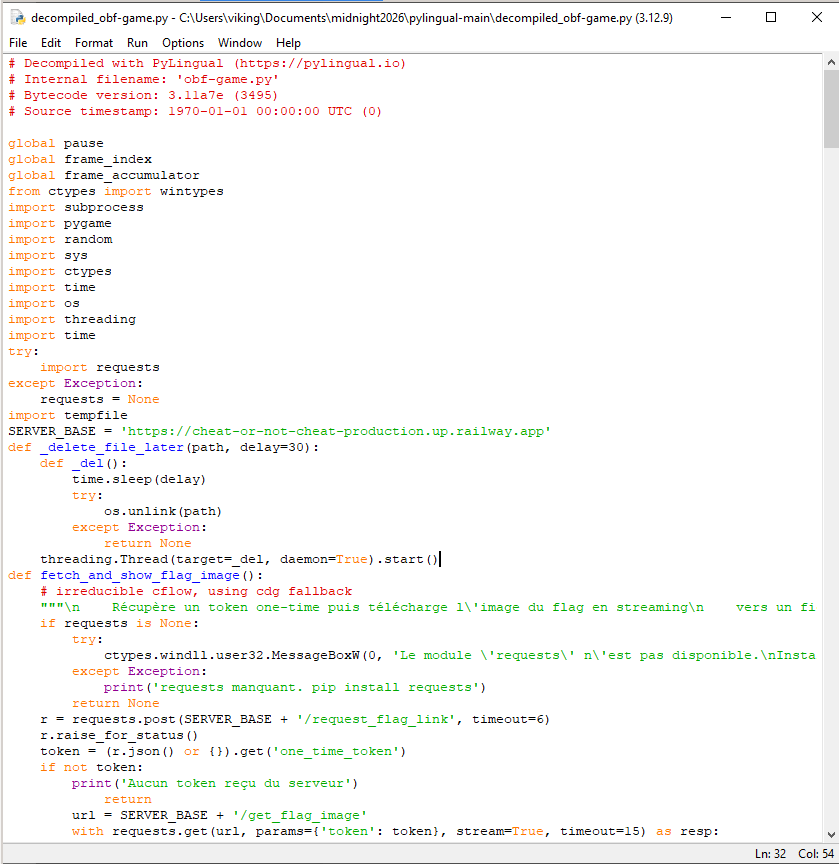

Here is the list of interesting functions names (note : victoire is french word for win, and lancer_niveau_2 stands for start_level_2)
def fetch_and_show_flag_image():
def load_flag_image_from_server():
def detect_cheatengine_process():
def anti_debug():
def afficher_victoire():
def lancer_niveau_2():
def victoire_level2():
...
Solving the challenge : the Cheat Engine way
Ok the first step is to bypass anti-debug. Here is the interesting part of Python code :
SUSPICIOUS_NAMES = ('cheatengine.exe', 'cheatengine-x86_64.exe', 'cheatengine-x86.exe', 'cheatengine64.exe', 'cheatengine', 'cheatengine-x86_64-sse4-avx2.exe')
SUSPICIOUS_DESCRIPTIONS = ('cheat engine',)
You can use Resource Hacker to edit the description of cheatengine-x86_64.exe, rename the binary, attach to the game and solve the challenge.
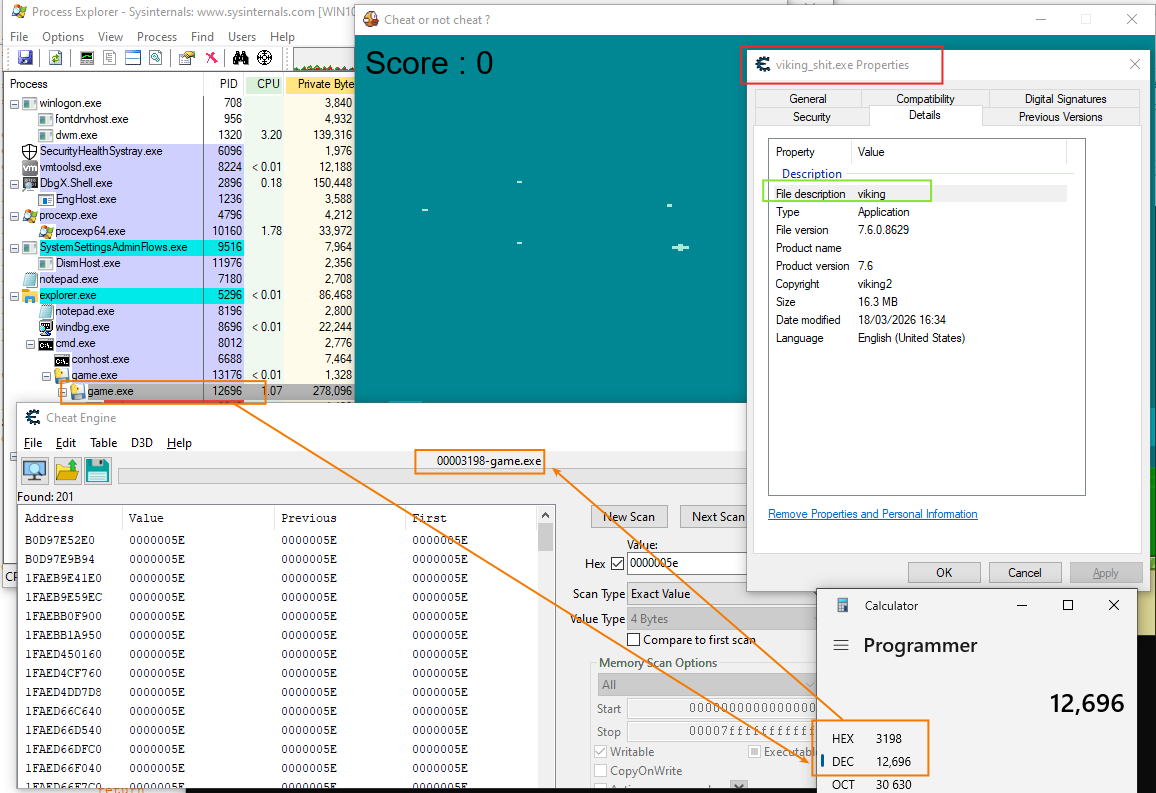
But we don’t care of CheatEngine (see other write-ups for that) we want to solve the chall using Windbg ;-)
Reading the Python source code
After reading the source code we can deduce the simple pseudo-code below.
anti_debug()
if (score == 6666) then
  if (score2 >=25) && (time > 0 seconds) then
    display('You Win')
    get_the_flag
In this decompiled_obf-game.py we can observe two types of “score” :
scorevariable : display the score to the userscore_cvariable : store the score in memory
# MAIN PROGRAM
score_c = ctypes.c_int(0)
while True:
    for event in pygame.event.get():
        # victoire (FR) == win (EN) - we can't win directly when the game starts
        if victoire and event.type == pygame.KEYDOWN and (event.key == pygame.K_ESCAPE):
                    pygame.quit()
                    sys.exit()
        # we can PAUSE the game
        if event.type == pygame.KEYDOWN and event.key == pygame.K_ESCAPE and (not victoire) and en_jeu:
                        toggle_pause()
    if en_jeu and (not pause) and (not victoire):
                            score += 1
                            score_c.value = score * 7
                            if score == 6666:
                                victoire = True
                                en_jeu = False
    if victoire:
        lancer_niveau_2()
The score_c is declared using ctypes which means this value is stored at memory address which survive to python runtime reset. The value of this variable is stored with a kind of obfuscation : the value is the score displayed in the game multplied by 7. It is an important detail if you are looking for a specific value in memory (for example if you use CheatEngine) but we will see it is not a big deal for us thanks to windbg.
Anti-debug bypass
The first step is to bypass anti-debug and attach Windbg to the game.exe (the child process of game.exe). Do you remember the anti_debug() function ?
if ctypes.windll.kernel32.IsDebuggerPresent():
        show_and_exit('why are you cheatingggg :( (native debugger detected)')
How can we bypass this protection ?
After the initial break we can patch IsDebuggerPresent Windows API usins a <address>.
0:013> u kernelbase!IsDebuggerPresent
KERNELBASE!IsDebuggerPresent:
00007fff`a8d1b6c0 65488b042560000000 mov   rax,qword ptr gs:[60h]
00007fff`a8d1b6c9 0fb64002        movzx   eax,byte ptr [rax+2]
00007fff`a8d1b6cd c3              ret

0:013> a kernelbase!IsDebuggerPresent
00007fff`a8d1b6c0 xor eax,eax
xor eax,eax
00007fff`a8d1b6c2 ret
ret
00007fff`a8d1b6c3
Verify the patch :
0:013> u kernelbase!IsDebuggerPresent
KERNELBASE!IsDebuggerPresent:
00007fff`a8d1b6c0 31c0            xor     eax,eax
00007fff`a8d1b6c2 c3              ret
00007fff`a8d1b6c3 0425            add     al,25h
00007fff`a8d1b6c5 60              ???
After that, my first approach was to try to debug directly the stack, the heap etc. But it is a nightmare because, among other things, the heap can be managed two differents ways :
- Python can use its own memory allocator called the Python memory manager
- Python can interact with the Windows heap manager via the C runtime library (msvcrt.dll), which in turn uses Windows heap functions
How can we debug efficiently Python objects in memory ?
Loading PyExt into Windbg
After poking around for a while, I found the PyExt WinDbg Extensions for Python :
This debugger extension provides visualizations for Python objects and stacktraces when debugging the CPython interpreter.
Load it and verify it is loaded using !pystack command.
0:013> !pytack
No export pytack found

0:013> .load c:\pyext.dll

0:013> !pystack
Thread 13:
	Thread does not contain any Python frames.
Unfortunately during the initial break of Windbg, the current thread does not contain any Python frame. How can I get a thread containing a Python frame ?
Debugging Python Bytecode
After reading the article Python behind the scenes #4: how Python bytecode is executed (written by Victor Skvortsov), we know more about the behaviour.
A good starting point for debugging Python bytecode execution is to set a breakpoint on the PyEval_EvalFrameDefault function. This function is the core interpreter loop responsible for executing Python bytecode, and pausing here allows you to inspect the current execution state, including variables, call stack, and bytecode instructions.
Indeed the role of this function is to execute a single Python frame’s bytecode (the interpreter loop) : it reads opcodes, dispatches handlers, updates the frame, and returns the result or exception. All Python-level execution (function bodies, comprehensions, module code) is driven through this path.
Set a breakpoint on PyEval_EvalFrameDefault.
0:013> bu python311!PyEval_EvalFrameDefault ".echo new frame;!pystack;"

0:013> bl
     0 e Disable Clear  00007fff`76b2cc20     0001 (0001)  0:**** python311!_PyEval_EvalFrameDefault ".echo new frame;!pystack;"
Then continue to run the game and wait for a break.
Looking at Globals
We can look at the [Globals] of the file “obf-game.py”, just click on the link which will execute the command !pyobj <PyDictObject address>.
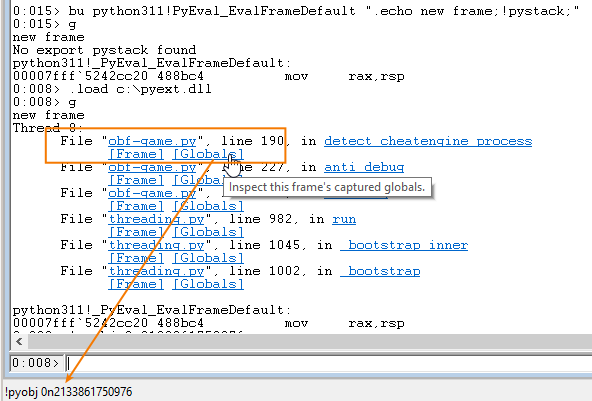
Then we look at the ‘score_c’: <c_long object>.
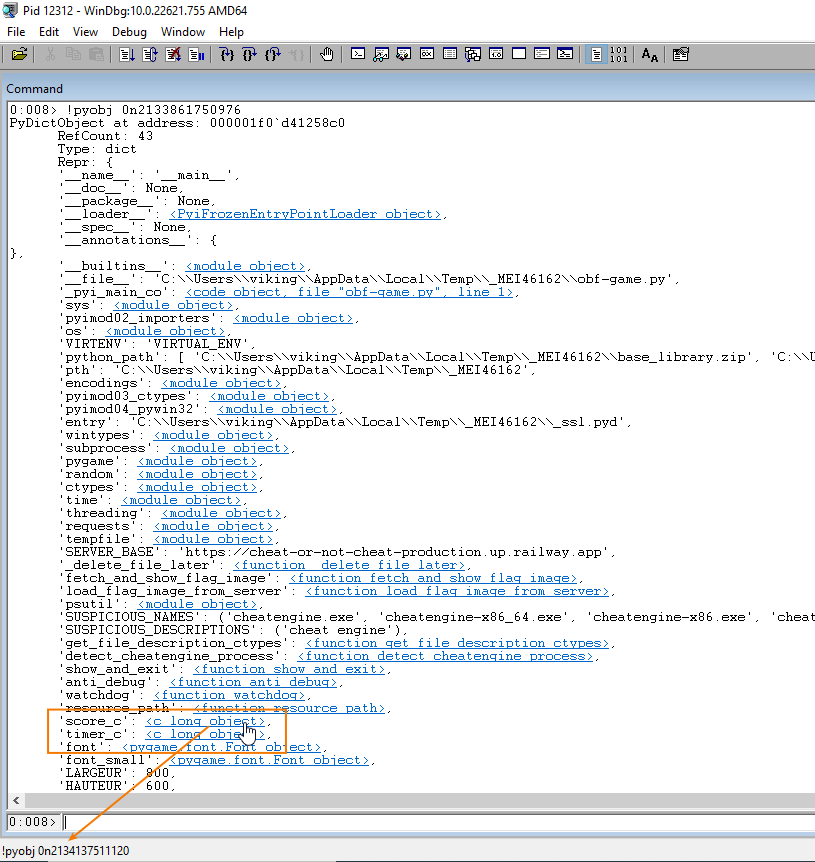
Just click on the link and get the PyObject address.
Note : when you click and get the auto-generated command pyobj, the memory address use the “natural” format insteads of “hex” format. In the example below 0n2134137511120 == 0x000001f0e4821cd0 I found that disturbing…
0:008> !pyobj 0n2134137511120
PyObject at address: 000001f0`e4821cd0
	RefCount: 1
	Type: c_long
	Repr: <c_long object>
In the end we have a nice view on the python score_c c_long PyObject layout in memory (if you are curious about it : more details here).
0:008> dps 000001f0`e4821cd0 L4
000001f0`e4821cd0  00000000`00000001
000001f0`e4821cd8  000001f0`d4492ad0
000001f0`e4821ce0  000001f0`e4821d18
000001f0`e4821ce8  00000000`00000001
The score_c value is stored at PyObject+0x10. We can observe it is set to zero when the game starts.
0:008> dq 000001f0`e4821d18 L1
000001f0`e4821d18  00000000`00000000
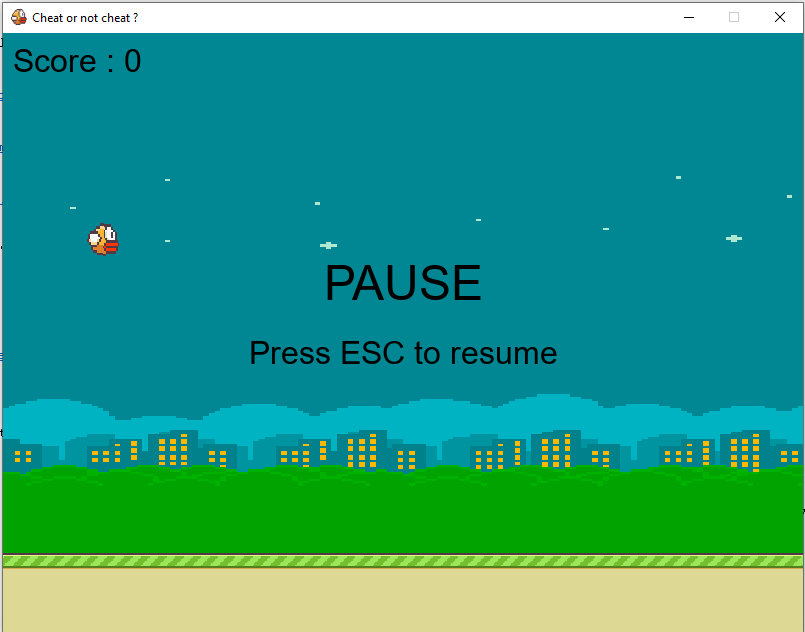
Press escape in order to put the game in PAUSE mode.
Modify the score value
It’s cheat time : just modify the score in memory and visualize the result :-)
0:008> eq 000001f0`e4821d18 0n6665*7
0:008> dq 000001f0`e4821d18 L1
000001f0`e4821d18  00000000`0000b63f
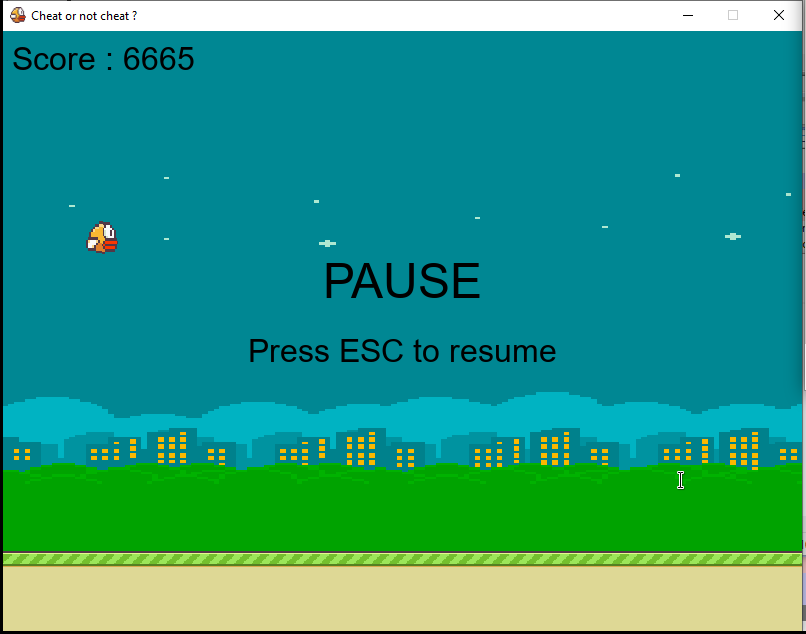
Continue the game and succeed to get a score of 6666. But we are not finished… it start level 2 !
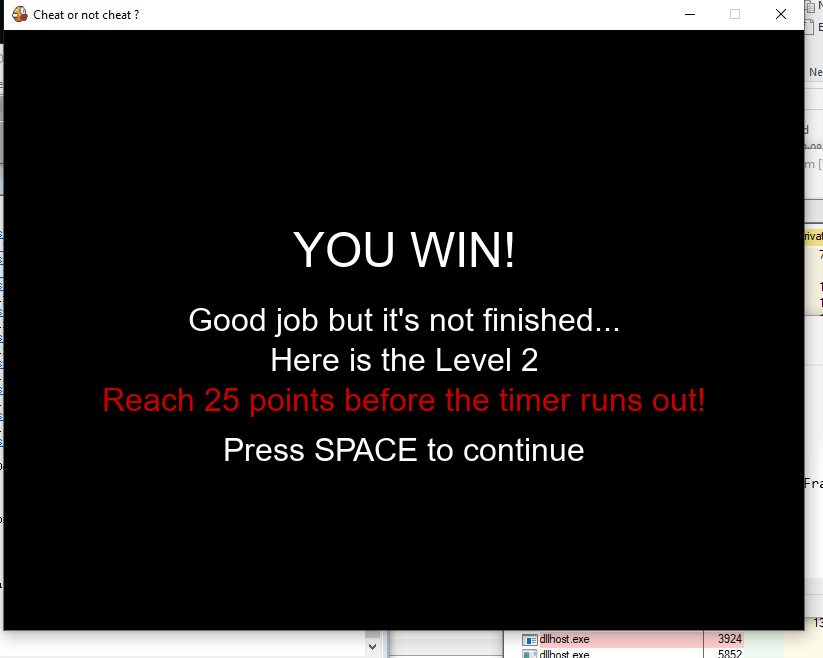
Because we have 20 seconds to reach 25 points, it’s probably not possible to win the game without cheating :-D
It’s cheat time (again)
Just like we did in the previous part we can locate and modify the timer : just click on the timer_c link, get the PyObject address and modify the timer value (for example set it to 4096 == 0xFFF).
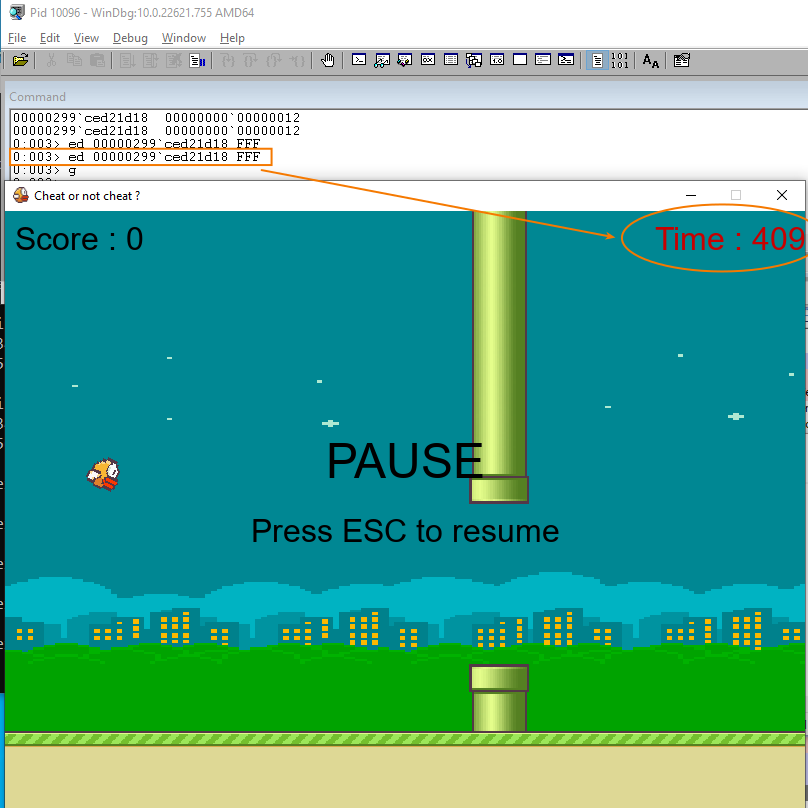
With 4096 seconds, FOR SURE we can reach 25 points. But wait, can we cheat more and win without playing the game ?
Hijack Execution Flow
As we did in the previous step, look at the [Globals] of the file “obf-game.py”. This time, we’re going to take a closer look at the function entries : as you may notice we can retrieve the PyFunctionObject address.
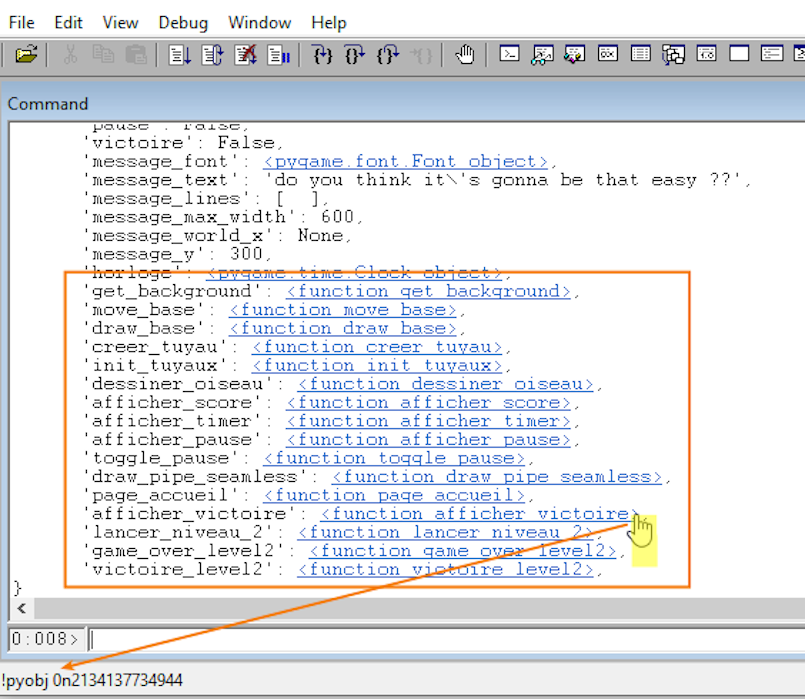
What is a PyFunctionObject (more details here for python 3.11) ?
#define COMMON_FIELDS(PREFIX) \
    PyObject *PREFIX ## globals; \
    PyObject *PREFIX ## builtins; \
    PyObject *PREFIX ## name; \
    PyObject *PREFIX ## qualname; \
    PyObject *PREFIX ## code;        /* A code object, the __code__ attribute */ \
[snipped...]

typedef struct {
    PyObject_HEAD
    COMMON_FIELDS(func_)
    PyObject *func_doc;         /* The __doc__ attribute, can be anything */
[snipped...]
} PyFunctionObject;
Key points :
- PyObject_HEAD : includes reference count and type pointer
- COMMON_FIELDS(func_) : is a macro that expands to common fields shared across function objects
You can verify, here is an example of PyFunctionObject structure for function afficher_pause :
0:011> !pyobj 0000018b`3c768ae0
PyFunctionObject at address: 0000018b`3c768ae0
	RefCount: 1
	Type: function
	Repr: <function afficher_pause>
And eventually you can verify this object contains the pointer to PyCodeObject (bytecode) which will be executed !
0:011> !pyobj poi(0000018b`3c768ae0+30)
PyCodeObject at address: 0000018b`2c9b7860
	RefCount: 2
	Type: code
	Repr: <code object, file "obf-game.py", line 406>
In the end here is the plan :
- patch
function_afficher_pausebytecode address with thevictoire_level2bytecode address - verify it is patched
- continue the game
- hit ESC for trigger
function_afficher_pausewhich will jump ontovictoire_level2 - Win !!!
Note : traductions can help to understand…
- function_afficher_pause (FR) == display_pause (EN)
- victoire_level2 (FR) == win_level2 (EN)
Find function_afficher_pause + its bytecode addresses.
0:011> !pyobj 0n1697526483680
PyFunctionObject at address: 0000018b`3c768ae0
	RefCount: 1
	Type: function
	Repr: <function afficher_pause>

0:011> !pyobj poi(0000018b`3c768ae0+30)
PyCodeObject at address: 0000018b`2c9b7860
	RefCount: 2
	Type: code
	Repr: <code object, file "obf-game.py", line 406>
The function_afficher_pause function is at 0000018b3c768ae0 and the bytecode executed is at 0000018b2c9b7860.
Find victoire_level2 + its bytecode addresses.
0:011> !pyobj 0n1697526484800
PyFunctionObject at address: 0000018b`3c768f40
	RefCount: 1
	Type: function
	Repr: <function victoire_level2>

0:011> !pyobj poi(0000018b`3c768f40+30)
PyCodeObject at address: 0000018b`2cb8bde0
	RefCount: 2
	Type: code
	Repr: <code object, file "obf-game.py", line 591>
The victoire_level2 function is at 0000018b3c768f40 and the bytecode executed is at 0000018b2cb8bde0.
Patch the bytecode address.
0:011> eq 0000018b`3c768ae0+30 0x0000018b2cb8bde0

0:011> !pyobj poi(0000018b`3c768ae0+30)
PyCodeObject at address: 0000018b`2cb8bde0      <---------------------------- this value was 0000018b`2c9b7860
	RefCount: 2
	Type: code
	Repr: <code object, file "obf-game.py", line 591>

0:011> g
Now hit ESC and win the game !!!
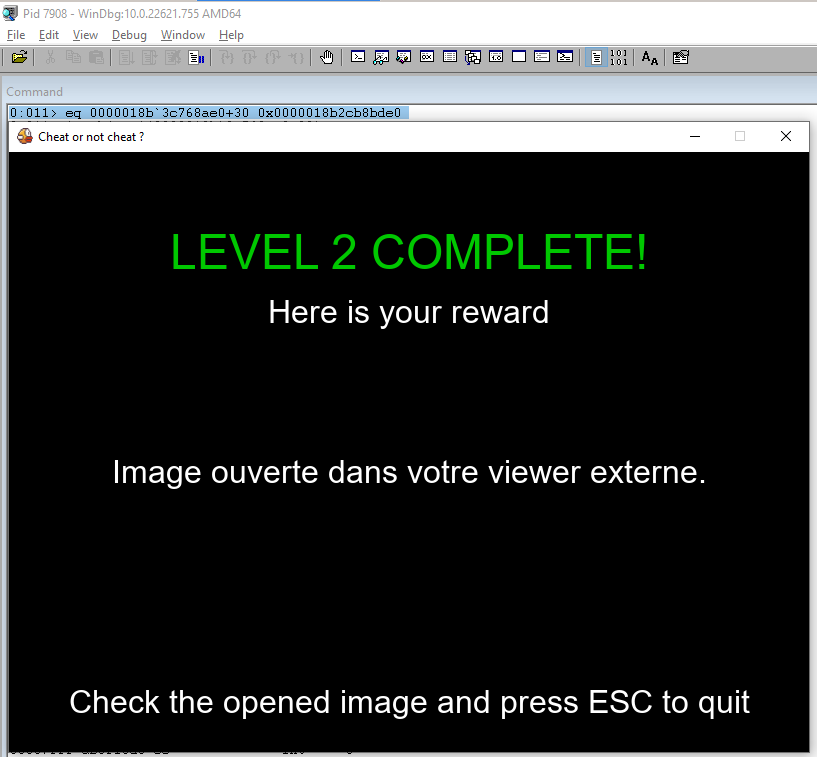
Windbg write-up of the challenge
Start the game.exe, attach to the subprocess and load PyExt.
[snipped]
ModLoad: 00007fff`a5930000 00007fff`a5944000   C:\windows\SYSTEM32\resourcepolicyclient.dll
ModLoad: 00007fff`aac40000 00007fff`aad55000   C:\windows\System32\MSCTF.dll
ModLoad: 00007fff`98040000 00007fff`98139000   C:\windows\SYSTEM32\textinputframework.dll
(1ee4.2ff4): Break instruction exception - code 80000003 (first chance)
ntdll!DbgBreakPoint:
00007fff`ab5f10d0 cc              int     3

0:018> .load c:\pyext.dll
Patch anti-debug function.
0:018> a kernelbase!isdebuggerpresent
00007fff`a8d1b6c0 xor eax,eax
xor eax,eax
00007fff`a8d1b6c2 ret
ret
00007fff`a8d1b6c3
Set a break on PyEval_EvalFrameDefault.
0:003> bu python311!PyEval_EvalFrameDefault ".echo new frame;!pystack;"
0:003> g
new frame
Thread 11:
	File "obf-game.py", line 180, in detect_cheatengine_process
		[Frame] [Globals]
	File "obf-game.py", line 227, in anti_debug
		[Frame] [Globals]
	File "obf-game.py", line 235, in watchdog
		[Frame] [Globals]
	File "threading.py", line 982, in run
		[Frame] [Globals]
	File "threading.py", line 1045, in _bootstrap_inner
		[Frame] [Globals]
	File "threading.py", line 1002, in _bootstrap
		[Frame] [Globals]
python311!_PyEval_EvalFrameDefault:
00007fff`76b2cc20 488bc4          mov     rax,rsp
Get the [Globals] of obf-game.py (by clicking the link in Windbg), then look for the Python functions function_afficher_pause and victoire_level2.
Note : traductions can help to understand…
- function_afficher_pause (FR) == display_pause (EN)
- victoire_level2 (FR) == win_level2 (EN)
0:011> !pyobj 0n1697249450176
PyDictObject at address: 0000018b`2bf358c0
	RefCount: 42
	Type: dict
	Repr: {
	'__name__': '__main__',
[sniped]
	'get_background': <function get_background>,
	'move_base': <function move_base>,
	'draw_base': <function draw_base>,
	'creer_tuyau': <function creer_tuyau>,
	'init_tuyaux': <function init_tuyaux>,
	'dessiner_oiseau': <function dessiner_oiseau>,
	'afficher_score': <function afficher_score>,
	'afficher_timer': <function afficher_timer>,
	'afficher_pause': <function afficher_pause>,                <--------------------------- HERE
	'toggle_pause': <function toggle_pause>,
	'draw_pipe_seamless': <function draw_pipe_seamless>,
	'page_accueil': <function page_accueil>,
	'afficher_victoire': <function afficher_victoire>,
	'lancer_niveau_2': <function lancer_niveau_2>,
	'game_over_level2': <function game_over_level2>,
	'victoire_level2': <function victoire_level2>,               <--------------------------- HERE
	'native_val': 0,
	't': {
	'rects': (<pygame.rect.Rect object>, <pygame.rect.Rect object>),
	'scored': False,
	'center_x': 2080,
},
	'top_rect': <pygame.rect.Rect object>,
	'bottom_rect': <pygame.rect.Rect object>,
	'oiseau_rect': <pygame.rect.Rect object>,
	'event': <pygame.event.Event object>,
}
In the end here is the plan :
- patch
function_afficher_pausebytecode address with thevictoire_level2bytecode address - verify it is patched
- continue the game
- hit ESC for trigger
function_afficher_pausewhich will jump ontovictoire_level2 - Win !!!
Find function_afficher_pause + its bytecode addresses.
0:011> !pyobj 0n1697526483680
PyFunctionObject at address: 0000018b`3c768ae0
	RefCount: 1
	Type: function
	Repr: <function afficher_pause>

0:011> !pyobj poi(0000018b`3c768ae0+30)
PyCodeObject at address: 0000018b`2c9b7860
	RefCount: 2
	Type: code
	Repr: <code object, file "obf-game.py", line 406>
The function_afficher_pause function is at 0000018b3c768ae0 and the bytecode executed is at 0000018b2c9b7860.
Find victoire_level2 + its bytecode addresses.
0:011> !pyobj 0n1697526484800
PyFunctionObject at address: 0000018b`3c768f40
	RefCount: 1
	Type: function
	Repr: <function victoire_level2>

0:011> !pyobj poi(0000018b`3c768f40+30)
PyCodeObject at address: 0000018b`2cb8bde0
	RefCount: 2
	Type: code
	Repr: <code object, file "obf-game.py", line 591>
The victoire_level2 function is at 0000018b3c768f40 and the bytecode executed is at 0000018b2cb8bde0.
Patch the bytecode address.
0:011> eq 0000018b`3c768ae0+30 0x0000018b2cb8bde0

0:011> !pyobj poi(0000018b`3c768ae0+30)
PyCodeObject at address: 0000018b`2cb8bde0      <---------------------------- this value was 0000018b`2c9b7860
	RefCount: 2
	Type: code
	Repr: <code object, file "obf-game.py", line 591>

0:011> g
Now hit ESC and win the game !!!
Conclusion
It is possible to debug a PyInstaller EXE file using Windbg. I found it more interesting this way because I can get precise information very quickly. Moreover I felt like I had more control on what is going on and what can be done with memory. Thanks for reading, I hope you learnt something and your feedbacks are welcome !
Files if needed :


Resources :
https://midnightflag.fr/
https://pyinstaller.org/
https://github.com/extremecoders-re/pyinstxtractor
https://github.com/syssec-utd/pylingual/
https://github.com/SeanCline/PyExt
https://web.archive.org/web/20260308235510/https://tenthousandmeters.com/blog/python-behind-the-scenes-4-how-python-bytecode-is-executed/
https://github.com/python/cpython/blob/main/Include/object.h
https://github.com/python/cpython/blob/3.11/Include/cpython/funcobject.h